A workspace is a folder you opened in 10nx. A worktree is a second checkout of the same git repo, on its own branch, in its own folder, so an agent can work on one task without touching the files you or another agent are using.
Use this page when you want to understand what 10nx does when you switch worktrees, or why a file or terminal shows in one worktree and not another.
The pieces
| Thing | What it is | Where it lives |
|---|---|---|
| Workspace | A folder you opened, with its own window, tabs and layout | Anywhere on your Mac |
| Main checkout | The repo's own working tree | The workspace folder |
| Worktree | A git worktree with its own branch |
<repo>/.claude/worktrees/<name> |
| Branch | The worktree's branch, named after it (plus git.branch_prefix) |
In the repo |
10nx only counts worktrees in .claude/worktrees/, the folder Claude Code itself uses. A worktree you create there with git worktree add, or that Claude creates, shows up just like one 10nx made. Worktrees anywhere else are ignored.
A workspace can hold several repos side by side (a folder of repos). Each one gets its own worktrees, and the New worktree dialog asks which repo.
A worktree is a mode, not a window
You switch to a worktree in place, from the worktree strip or with Cmd+Ctrl+] and Cmd+Ctrl+[. Nothing closes and nothing restarts: tabs and terminals that belong to other worktrees are hidden and keep running.
The ⌄ beside the strip lists every worktree with how many files it has changed. Click one to switch to it.
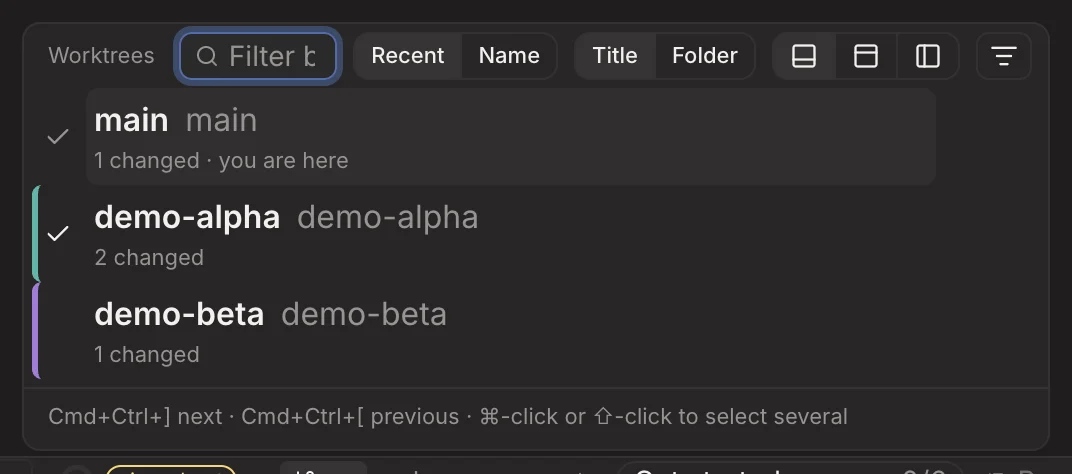
What follows the worktree you're in:
- the file tree, Quick Open (double-Shift) and Find in Files (Cmd+G);
- the Git view's Local Changes;
- new terminal and Claude tabs, which start in the worktree's folder;
- the layout of the panels and splits, and the Claude input bar's history.
What doesn't:
- a tab you've marked as shown in every worktree keeps the copy it was opened from;
- wikilinks always resolve against the main checkout;
- a Run menu action that isn't
per_worktreeruns at the repo root wherever you start it.
Tabs belong to a worktree
A file or terminal tab you open shows only in the worktree you opened it in. The dot on the tab says so: filled means it's scoped to a worktree, a ring means it's shared. Click the dot, or press Cmd+Ctrl+O, to switch a tab between "only here" and "every worktree". Right-click › Show in picks any set of worktrees. Pinned tabs show everywhere.
Open and closed worktrees
The strip shows main plus the worktrees you've opened. The ▾ list shows all of them, with a checkmark for the open ones, their branch, how many files changed, and whether a Claude session there is working, waiting for you or idle. Only open worktrees take part in Cmd+Ctrl+]. A worktree Claude creates on its own isn't opened for you.
Isolation is for development, not security
A worktree keeps agents' files apart. It doesn't stop a process from reading or writing outside its folder: everything still runs as your user. See Security and permissions.
Next steps
- Set up a repo for worktrees
- Run several Claude sessions at once
- Environment variables: what each worktree's terminals are told about it